


 Posts
Posts


 To customize the keyframe (poster frame) in your iPhoto events, start by choosing an event in the iPhoto Library. Scroll through the pictures using your mouse or trackpad by hovering over the event and slowly moving the cursor from left to right. Stop at the photo you've selected to be the keyframe of the event. Click the control key on your keyboard and choose the 'make key photo' option. Bada Bing
Tuesday, August 9, 2011
How to Change the Iphoto Event KeyFrame
To customize the keyframe (poster frame) in your iPhoto events, start by choosing an event in the iPhoto Library. Scroll through the pictures using your mouse or trackpad by hovering over the event and slowly moving the cursor from left to right. Stop at the photo you've selected to be the keyframe of the event. Click the control key on your keyboard and choose the 'make key photo' option. Bada Bing

Tuesday, August 2, 2011
Changing Your Computer's Name and User Names
Now and again I meet clients who have bought a used computer, pre-installed with an operating system and user accounts that become disconcerting for them because it's somebody else's name.
It's simple to personalize your computer by changing the computer's name as well as the user name.
To change the computer name, simply navigate to the System Preferences > Sharing > Computer Name.
Changing the user name and password is just as simple, navigate to the System Preferences > Accounts, click the lock and login to make changes and change your name and password there.
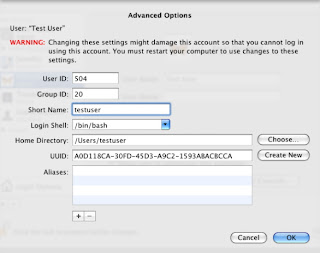 That won't change the home folder name, however. To do that, you must hold the Control key and click on the account name who's home folder you'd like to change, that will take you to advanced options where you can change the account name and home folder.
It's simple to personalize your computer by changing the computer's name as well as the user name.
To change the computer name, simply navigate to the System Preferences > Sharing > Computer Name.
Changing the user name and password is just as simple, navigate to the System Preferences > Accounts, click the lock and login to make changes and change your name and password there.
 That won't change the home folder name, however. To do that, you must hold the Control key and click on the account name who's home folder you'd like to change, that will take you to advanced options where you can change the account name and home folder.
Tuesday, May 10, 2011
Up Your Media's Quick Tips Newsletter Volume III
Here are some issues I've come across over the past month or so, thanks to inquisitive clients who offered me the chance to answer their questions.
Floating Dictionary. This one is fun and useful, bring up instant definitions right on your screen. To activate the floating dictionary, simultaneously click command, control and the letter 'D' while hovering over any word on your display.
 How To Copy A CD
1.) Insert the CD, open Disk Utility (Go Menu - Utilities)
2.) Select the CD and click New Image - for image format choose DVD/CD Master
3.) Once that's created, insert Blank CD
4.) Select the new image you created and click Burn
Floating Dictionary. This one is fun and useful, bring up instant definitions right on your screen. To activate the floating dictionary, simultaneously click command, control and the letter 'D' while hovering over any word on your display.
 How To Copy A CD
To copy a music or data CD
1.) Insert the CD, open Disk Utility (Go Menu - Utilities)
2.) Select the CD and click New Image - for image format choose DVD/CD Master
3.) Once that's created, insert Blank CD
4.) Select the new image you created and click Burn
Use Your Portable In Closed Clamshell Mode.
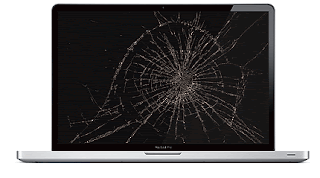 Perhaps you've cracked your screen and need to use your MacBook while you wait for a replacement part, or maybe you just want to use a larger screen than the 13" built-in.
First, connect a USB keyboard and mouse to your computer. With the computer turned on, connect the Apple portable (using the appropriate Apple adapter if necessary) to the appropriate port on the external display or projector and turn the display or projector on. Once your computer's Desktop appears on the external display, close the computer's lid. Once the lid is closed, wake the computer up by either clicking your mouse button or by pressing a key on your external keyboard.
 Perhaps you've cracked your screen and need to use your MacBook while you wait for a replacement part, or maybe you just want to use a larger screen than the 13" built-in.
 First, connect a USB keyboard and mouse to your computer. With the computer turned on, connect the Apple portable (using the appropriate Apple adapter if necessary) to the appropriate port on the external display or projector and turn the display or projector on. Once your computer's Desktop appears on the external display, close the computer's lid. Once the lid is closed, wake the computer up by either clicking your mouse button or by pressing a key on your external keyboard.
Find the Source File in iPhoto
Where does the jpg go once you've imported it into iPhoto? You can find the root file by holding down the Control Key while you click on the iPhoto application icon, choose "Show Package contents." Browse through the folder until you find your Originals folder.
Return To Zero
To return to zero or go to beginning of your clip in Garage Band or iMovie, you have three choices, click either Return or Z or Home.
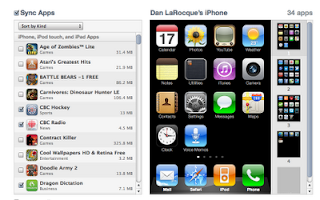 To arrange your iPhone or iPad apps
Where does the jpg go once you've imported it into iPhoto? You can find the root file by holding down the Control Key while you click on the iPhoto application icon, choose "Show Package contents." Browse through the folder until you find your Originals folder.
Return To Zero
To return to zero or go to beginning of your clip in Garage Band or iMovie, you have three choices, click either Return or Z or Home.
 To arrange your iPhone or iPad apps
You can press and hold on the device's screen until you activate the feature and move your apps by hand OR you can open the apps interface in iTunes when it's plugged in and move them from there.
Control Display Resolution.
Control Display Resolution.
Many of us are better off using a display resolution that makes text and pictures easier to read on our screens. To change your display resolution, open the Display dialogue in your System Preferences and choose from the list until you find one you like. Lower numbers (800 by 600) will result in larger text and icons, higher numbers (1280 by 800) will result in smaller text and icons.
And that't it for this month, if you want your specific Apple computer question answered just email it to me and I'll do my best to find out for you.
And that't it for this month, if you want your specific Apple computer question answered just email it to me and I'll do my best to find out for you.
Monday, March 14, 2011
Up Your Media's Quick Tips Newsletter Volume II
Hi, and welcome to another edition of our Quick Mac Tips newsletter. These are some issues that have come up with my Apple cpmputer clients around Parksville, Qualicum, Nanaimo and central Vancouver Island in the past weeks.
 In iPhoto 9 you can now choose to send mail via iphoto or your mac mail application I suggest choosing the Mac Mail program. Choose this option in the iPhoto General Preferences pane.
Hot Corners, is one of my favourite navigation features. If you're like me, you tend to have a lot of windows and applications open at once. In your System Preferences pane, go to Expose and Spaces, and pick Active Screen Corners, I like my top right corner to tile all open windows and my lower right corner to clear all windows and expose the Desktop.
You can add a photo or logo to your email signature by opening up the signature dialogue in your mail program and simply dragging the image directly onto that particular signature from either the finder or the iPhoto application.
 Change your Safari homepage from the default Apple store to a page more suitable to you. In the Safari preferences pane, simply type in the url to your favourite page where it says 'home page'.
Need to translate text or full webpages, use the Google translator at http://translate.google.com/ . This free tool will allow you to translate over 50 languages
iTunes Radio contains access to hundreds of radio stations worldwide in every genre.
 To save a PDF for the best emailing and sharing compatibility, choose print in your Pages, MS Word, Safari or Mail program, at the bottom left of that window you'll see the PDF tab, from there you can save the PDF or mail it directly
To type fractions go into the keyboard language drop down menu near the top right of your screen (the flag beside the clock) and choose to "show character viewer". From there you choose symbols, then number and number symbols, pick the fraction you want and click insert.
 In iPhoto 9 you can now choose to send mail via iphoto or your mac mail application I suggest choosing the Mac Mail program. Choose this option in the iPhoto General Preferences pane.
Hot Corners, is one of my favourite navigation features. If you're like me, you tend to have a lot of windows and applications open at once. In your System Preferences pane, go to Expose and Spaces, and pick Active Screen Corners, I like my top right corner to tile all open windows and my lower right corner to clear all windows and expose the Desktop.
You can add a photo or logo to your email signature by opening up the signature dialogue in your mail program and simply dragging the image directly onto that particular signature from either the finder or the iPhoto application.
 Change your Safari homepage from the default Apple store to a page more suitable to you. In the Safari preferences pane, simply type in the url to your favourite page where it says 'home page'.
Need to translate text or full webpages, use the Google translator at http://translate.google.com/ . This free tool will allow you to translate over 50 languages
iTunes Radio contains access to hundreds of radio stations worldwide in every genre.
 To save a PDF for the best emailing and sharing compatibility, choose print in your Pages, MS Word, Safari or Mail program, at the bottom left of that window you'll see the PDF tab, from there you can save the PDF or mail it directly
To type fractions go into the keyboard language drop down menu near the top right of your screen (the flag beside the clock) and choose to "show character viewer". From there you choose symbols, then number and number symbols, pick the fraction you want and click insert.
Subscribe to:
Posts (Atom)